
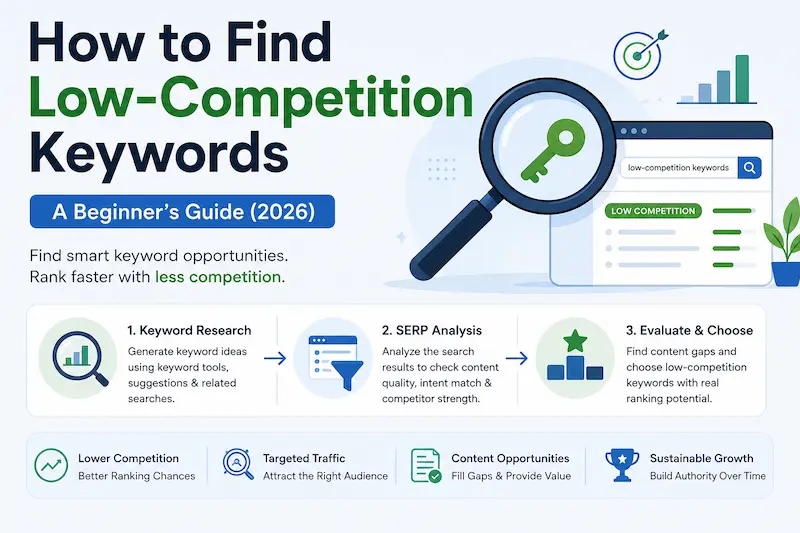
How to Find Low-Competition Keywords
Finding the right keywords can be challenging when you’re a beginner competing with established websites. The good news is that you don’t need to target popular keywords to attract the right readers. Learning to find low-competition keywords helps you discover search terms that smaller blogs can realistically rank for.
Instead of guessing, you can use simple research techniques to identify low-competition keywords, understand search intent, and uncover long-tail keywords that match what your audience is searching for. In this beginner-friendly guide, you’ll learn how to evaluate keyword difficulty, find relevant opportunities, and choose keywords that fit your blog’s niche and SEO goals in 2026.
What Are Low-Competition Keywords?
Low-competition keywords are search terms where Google’s current results offer a relevant website a realistic chance to rank.
They may have one or more of these characteristics:
- Smaller websites ranking
- Weak or outdated content
- Poorly matched search intent
- Thin explanations
- Unanswered questions
- Limited topical coverage
- Specific, long-tail search queries
However, low competition does not mean zero competition. You still need to create relevant, useful content that meets the searcher’s needs.
Low Competition vs. Low Search Volume
These terms are related, but they mean different things.
| Low-Competition Keyword | Low-Volume Keyword |
|---|---|
| Relatively easier to compete for | Has relatively few searches |
| May still have useful search demand | May have limited search demand |
| Evaluated partly by analyzing search results | Relates primarily to search demand |
| Can offer opportunities for a new blog | Isn’t automatically valuable |
Actionable tip: Don’t choose a keyword simply because it appears easy to rank for. Look for a combination of low competition, relevance, useful search intent, and reasonable search demand.
Low Keyword Difficulty vs. Actual SERP Competition
This is where many beginners go wrong.
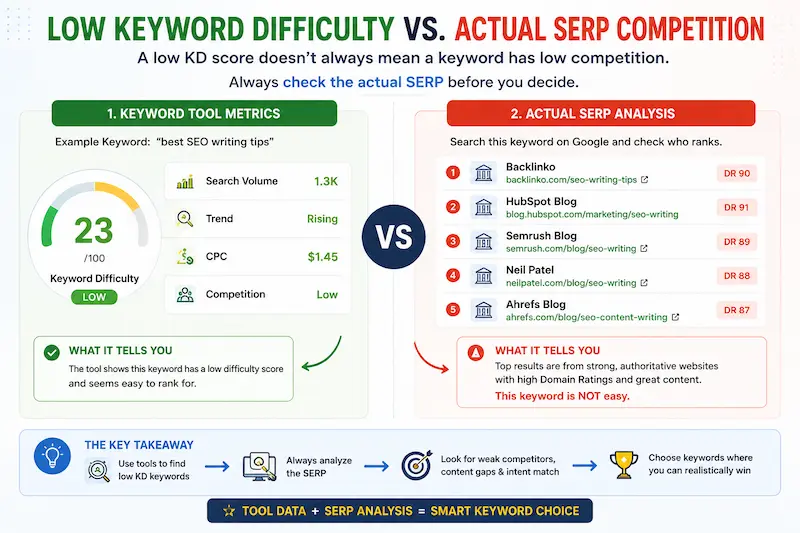
A keyword research tool may show a low keyword difficulty (KD) score. That can be a useful signal, but it shouldn’t be your final decision.
Different SEO tools calculate keyword difficulty using their own methodologies, so the number isn’t a universal Google ranking score.
Why KD Alone Isn’t Enough
Imagine you find a keyword with a low difficulty score.
You search it on Google and discover that the top results are:
- Highly authoritative websites
- Comprehensive articles
- Strongly relevant pages
- Well-established domains
- Pages with strong backlink profiles
Would you still call that keyword easy?
Probably not.
That’s why your workflow should be:
Keyword tool → shortlist → Google SERP → final decision
What Should You Check?
| Factor | What it tells you | Importance |
|---|---|---|
| Keyword difficulty | Estimated ranking difficulty | High |
| Search volume | Potential search demand | High |
| Search intent | What the searcher expects | Very high |
| SERP competition | Who actually ranks | Very high |
| Competitor strength | How difficult those pages may be to beat | Very high |
| Content gaps | Whether you can create something better | Very high |
| Website relevance | Whether your site fits the topic | Very high |
The key lesson: KD helps you filter keywords. SERP analysis helps you validate them. This distinction is essential when learning How to Find Low-Competition Keywords, because a low KD score can still hide a highly competitive SERP.
How to Find Low-Competition Keywords Step by Step
Now let’s get to the practical part.
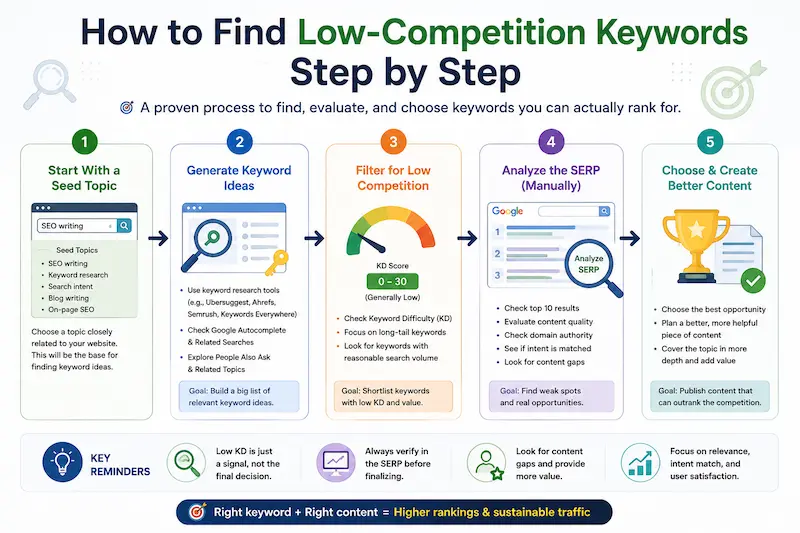
Step 1: Start With a Relevant Seed Topic
Begin with a topic closely related to your website.
For a practical SEO writing website, possible seed topics could include:
- SEO writing
- keyword research
- search intent
- blog writing
- on-page SEO
- content optimization
A seed keyword is simply a starting point for generating more specific keyword variations.
You don’t need to find the perfect keyword at this stage.
You need a relevant topic from which you can discover opportunities.
Step 2: Find Keyword Ideas and Long-Tail Variations
Once you have a seed topic, expand it into more specific searches. If you’re learning how to Find Low-Competition Keywords, start by expanding a relevant seed topic into specific and long-tail search queries.
You can use:
- Google Autocomplete
- People Also Ask
- Related Searches
- Keyword research tools
- Competitor articles
- Google Search Console
- Search suggestions
For example:
Seed keyword:keyword research
↓
More specific:keyword research for blogs
↓
Long-tail:how to find low-competition keywords for blog posts
The more specific query may have a clearer search intent and potentially more manageable competition.
But remember:
Long-tail doesn’t automatically mean low competition.
You still need to validate the SERP.
Step 3: Use Keyword Difficulty as a Filter
Now use an SEO tool to narrow your list.
Look for keywords with a difficulty level that appears realistic for your website.
But don’t blindly follow a rule like:
“Only target keywords below KD 10.”
There is no single KD number that guarantees a ranking.
Instead, use difficulty to create a shortlist.
For example:
| Keyword | KD | Search intent | Action |
|---|---|---|---|
| Keyword A | High | Relevant | ❌ Probably skip |
| Keyword B | Low | Relevant | 🟡 Investigate SERP |
| Keyword C | Low | Irrelevant | ❌ Skip |
| Keyword D | Moderate | Relevant | 🟢 Check SERP |
The important part comes next.
Step 4: Analyze the Google SERP Manually
This is the most important step in the entire process. The most reliable way to understand how to find low-competition keywords is to examine the actual pages ranking for your target query.
Search your keyword on Google and examine the pages that currently rank.
Don’t just look at the blue links.
Ask:
Are Small Websites Ranking?
If smaller or less-established websites appear among the top results, that’s potentially encouraging.
It suggests the SERP isn’t completely dominated by massive authoritative domains.
Is the Existing Content Weak?
Look for:
- Thin explanations
- Outdated information
- Poor structure
- Missing examples
- Generic advice
- Unanswered questions
- Weak introductions
- Poorly organized information
Weak content can indicate an opportunity—but only if you can genuinely create something better.
Does the Content Match Search Intent?
Look at the top-ranking pages.
Do they actually answer the query?
If the searcher wants a step-by-step guide but several results provide only basic definitions, there may be an opportunity to satisfy the intent more completely.
Are There Content Gaps?
Ask:
What are these pages failing to explain?
For example:
| Competitor covers | Competitor may miss |
|---|---|
| Keyword difficulty | Actual SERP evaluation |
| Search volume | Website-specific competition |
| Keyword tools | Free discovery methods |
| Long-tail keywords | How to validate them |
| Keyword lists | How to choose which ones to target |
| Basic SERP analysis | A clear Target/Skip decision |
This is where your content can become more useful than simply being longer.
Step 5: Check Competitor Strength and Content Gaps
Now look beyond the keyword itself.
Your competitors’ pages matter more than the keyword’s difficulty score alone. As part of your competitive keyword research, compare the keywords your competitors rank for with your own content to identify relevant topics they cover poorly or miss entirely.
Look at:
- Website authority
- Topical relevance
- Backlink strength
- Content depth
- Content freshness
- Search-intent match
- Overall usefulness
Strong Competition
A SERP may be difficult when most results are:
- Highly authoritative
- Extremely relevant
- Comprehensive
- Well-established
- Supported by strong backlinks
Potentially Weaker Competition
A SERP may offer a better opportunity when you see:
- Smaller niche websites
- Thin content
- Outdated articles
- Poorly matched content
- Weak page structure
- Missing information
- Forums or user-generated results
- Obvious content gaps
None of these signals guarantees a ranking.
They simply help you determine whether the opportunity is worth investigating. When you find a content gap, use it to create helpful, reliable, people-first content that provides more value than the existing results.
Knowing How to Find Low-Competition Keywords also means looking for opportunities where existing pages leave important questions unanswered.
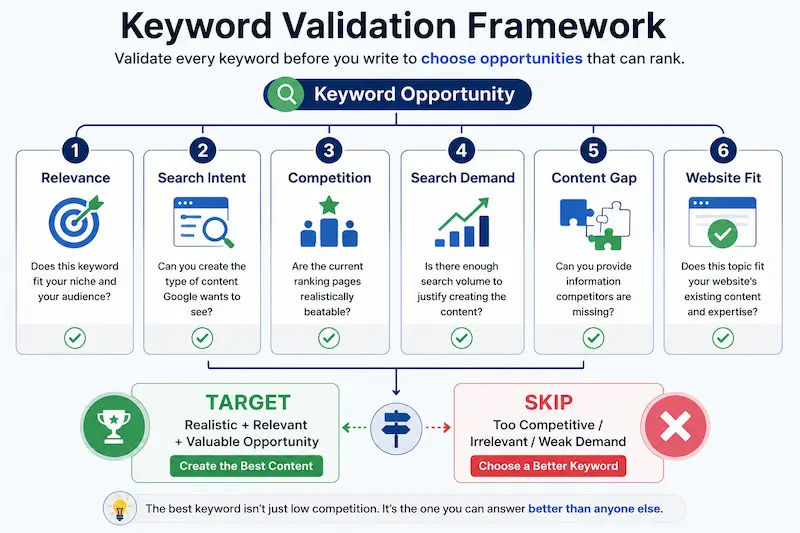
How to Validate a Keyword Before Writing
Before opening your WordPress editor, run this final check.
1. Relevance
Does the keyword directly fit your website?
2. Search Intent
Can you create the type of content Google appears to prefer?
3. Competition
Do the current ranking pages look realistically beatable?
4. Search Demand
Is there enough potential interest to justify creating the article?
5. Content Gap
Can you provide information competitors are missing?
6. Website Fit
Does the topic fit your existing topical coverage and expertise?
If you can answer yes to most of these questions, the keyword deserves serious consideration. This final validation step makes How to Find Low-Competition Keywords a practical decision-making process rather than a simple search for low KD scores.
Common Mistakes Beginners Make
1. Choosing a Keyword Only Because KD Is Low
A low score is a starting signal—not a ranking guarantee.
Always inspect the SERP.
2. Ignoring Search Intent
If Google expects a tutorial and you publish a short definition, low competition won’t save the article.
3. Chasing Extremely Low Search Volume
Easy to rank doesn’t necessarily mean valuable.
A keyword should still have meaningful relevance and potential.
4. Assuming Every Long-Tail Keyword Is Easy
Long-tail keywords are often more specific, but they can still have strong competition.
Check the actual results.
5. Ignoring Competitor Weakness
Don’t just count how many competitors exist.
Study how well they answer the query.
6. Choosing Irrelevant Keywords
A keyword can look incredibly easy and still be useless if it doesn’t fit your website.
Low-Competition Keyword Research Checklist
Before targeting a keyword, ask:
- Is it relevant to my niche?
- Is the search intent clear?
- Is the difficulty realistic?
- Does the keyword have useful search demand?
- Did I check the actual Google SERP?
- Are smaller or weaker websites ranking?
- Are there outdated or thin pages?
- Can I identify a genuine content gap?
- Can my website realistically compete?
- Can I create a significantly more useful answer?
If most boxes are checked, you may have a genuine ranking opportunity.
Finding a low-competition keyword is only the first step. You also need to evaluate whether it is relevant to your topic and search intent before you choose the right keyword for a blog post.
Final Takeaway
Learning how to find low-competition keywords is about choosing relevant search terms your website can realistically rank for, not just targeting the lowest keyword difficulty (KD).
Use keyword research tools to find ideas, analyze search intent, and inspect the Google SERP before choosing your target. Focus on keywords that match your niche and allow you to create more helpful content than competing pages.
Remember: Find → Filter → Inspect → Validate → Target.
FAQ: How to find low-competition keywords
Which niche has the lowest competition?
Micro-niches with specific audiences and underserved topics often have lower competition.
How can I identify my competitors’ keywords?
Use tools like Ahrefs, Semrush, or Google Search to analyze competing websites and their ranking keywords.
What is the best way to find keywords?
Combine keyword research tools, Google autocomplete, and search intent analysis to find relevant keywords.
How to find keywords with low competition?
Find long-tail keywords, check keyword difficulty, and analyze the current Google search results before targeting them.