

🏆 How to Rank Blog Posts on Google: A Step-by-Step Guide for Beginners
Publishing a blog post is only the beginning. If your article is not appearing in Google Search, getting little organic traffic, or sitting several pages behind your competitors, the problem may noYou publish a blog post, hit Publish, and expect Google to send some readers your way.
Then… nothing.
Your post may be well-written, but good writing alone doesn’t guarantee search visibility. To rank in Google, your content needs to target a relevant topic, satisfy the searcher’s intent, provide a genuinely useful answer, and make it easy for both readers and search engines to understand.
The good news? You don’t need a complicated SEO strategy to get started.
In this guide, you’ll learn how to rank blog posts on Google by following a practical process—from choosing the right keyword and understanding search intent to improving on-page SEO, internal links, indexing, and content quality.
You’ll also learn what to do when an existing blog post isn’t getting the impressions, clicks, or organic traffic you expected.
If you’re new to SEO writing, start with our SEO writing for beginners guide to understand the fundamentals before applying the strategies in this article.
Why Your Blog Post Isn’t Ranking Yet
A blog post can be well-written and still struggle to appear in Google search results. Usually, the problem isn’t one missing SEO trick. It’s a mismatch between the topic, search intent, content quality, competition, or how well Google can access and understand the page.
Before changing everything, identify where the problem actually is.
1. The topic doesn’t match what people are searching for
A topic may sound useful to you but have little search demand—or it may be too broad to compete for.
For example, “SEO” is extremely broad. A beginner-focused topic such as “how to find long-tail keywords for blog posts” gives you a much clearer audience and search need.
This is why keyword research should happen before you start writing, not after the article is finished.
2. Your content doesn’t satisfy the search intent
Search intent is the reason behind a search query.
Someone searching “how to find long-tail keywords” wants a process they can follow. Someone searching “long-tail keywords examples” may primarily want examples.
If your article gives the wrong type of answer, even strong on-page SEO may not be enough to make it competitive.
You can learn more about this in our guide to Search Intent SEO.
3. The article isn’t offering enough value beyond the obvious
Simply rewriting information that readers can find on dozens of other websites doesn’t give your article much reason to stand out.
Add value through:
- practical examples
- step-by-step instructions
- screenshots or demonstrations where useful
- original observations
- useful templates or checklists
- clearer explanations of confusing concepts
- specific examples for your target reader
The goal isn’t to make your article longer. It’s to make it more useful.
4. The page isn’t targeting a realistic keyword
A new or smaller website may struggle if every article targets highly competitive keywords.
Instead, look for more specific search queries that closely match your topic and audience. These can include long-tail keywords, specific questions, and lower-competition variations.
For example:
Broad:keyword research
More specific:how to find long-tail keywords for blog posts
The second query gives you a clearer content angle and a more defined search intent.
5. Google may not have enough signals yet
A new page doesn’t necessarily rank immediately after publication.
Google needs to discover and crawl the URL, understand its content, and determine how useful and relevant it is compared with other available results.
So don’t assume that a new article has failed simply because it isn’t ranking during its first few days or weeks.
The important takeaway
Before trying another SEO tactic, diagnose the problem first:
Topic → Search intent → Content value → Keyword targeting → Technical accessibility → Time
Once you know which part is holding the page back, you can make a focused improvement instead of randomly changing titles, adding keywords, or stuffing more content onto the page.
How Google Finds, Understands, and Ranks Content
Before you worry about ranking factors, it’s helpful to understand what happens after you publish a blog post.
Google generally needs to discover, crawl, index, and understand a page before it can consider showing that page in search results.
1. Google discovers your page
Google can discover new URLs through links from pages it already knows about, sitemaps, and other sources.
That’s one reason your site’s internal linking structure matters. When relevant pages link to a new article, those links can help Google discover the relationship between your content.
For WordPress sites, your XML sitemap can also help search engines discover important URLs.
2. Google crawls the page
Once Google discovers a URL, Googlebot may crawl the page and retrieve its content.
However, crawling doesn’t automatically mean that the page will appear in search results.
Technical problems such as accidental noindex directives, blocked resources, or accessibility issues can prevent a page from being properly processed.
3. Google indexes the content
After crawling, Google analyzes the page and decides whether it should be stored in its search index.
Indexing and ranking are not the same thing.
A page can be indexed but still rank poorly—or not receive meaningful search traffic—because other pages may provide a more relevant or useful result for a particular query.
4. Google determines which results are most relevant
When someone searches, Google evaluates indexed pages to determine which results are most relevant and useful for that query.
For your blog posts, focus on creating content that clearly answers the searcher’s question and provides genuine value. You don’t need to understand or optimize for every signal used by Google’s ranking systems.
For a deeper explanation of the factors that can affect search visibility, read our guide to Google ranking factors
For Google’s own explanation of how Search works, see How Google Search works. This is a good outbound link because we’re directing readers to Google’s primary documentation rather than another SEO blog.
Don’t confuse indexing with ranking
This distinction is important:
Crawled → Google accessed the page
Indexed → Google included the page in its searchable index
Ranking → The page appears at a particular position for a search query
So if your post is indexed but sitting on page 5, submitting the URL to Google again isn’t necessarily the solution.
The next step is to examine the topic, search intent, content quality, competition, and on-page optimization.
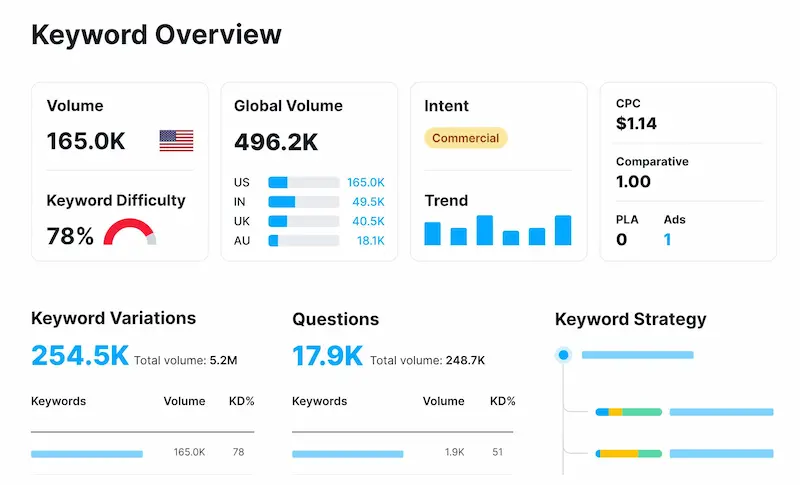
Step 1: Choose a Searchable, Low-Competition Topic
Start with a topic that is relevant to your audience and has a realistic search opportunity.
- Choose a specific target keyword.
- Check the current Google results before writing.
- Consider search intent and competition.
- Make sure you can provide something genuinely useful.
Simple formula:
Relevant topic + realistic keyword + clear intent = better starting point
Step 2: Match Search Intent Before Writing
Before creating an outline, understand what the searcher wants to find.
Ask:
- Is the query informational, commercial, navigational, or transactional?
- What type of content appears in Google?
- What important information are those pages missing?
Your article should satisfy the searcher’s goal rather than simply repeat the keyword.
Step 3: Build a Useful Content Structure
Create a clear structure before writing.
- Use one focused H1.
- Organize major topics with H2s and H3s.
- Answer important questions directly.
- Arrange sections in a logical order.
- Remove sections that don’t add value.
A good structure makes your content easier to read, scan, and understand.
Step 4: Write Helpful, People-First Content
Focus on solving the reader’s problem—not reaching a specific word count.
- Give the main answer early.
- Explain concepts clearly.
- Use practical examples.
- Add information that helps readers take action.
- Remove unnecessary filler and repetition.
Remember: More words don’t automatically mean more value.
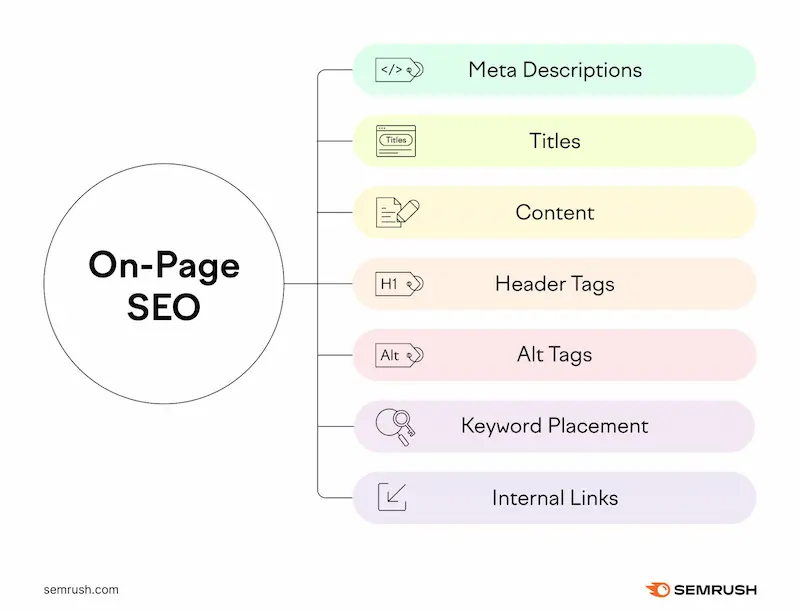
Step 5: Optimize On-Page SEO
Once your content is useful and aligned with search intent, check the main on-page elements:
- Write a clear, relevant SEO title.
- Create a useful meta description.
- Keep the URL short and descriptive.
- Use a clear H1 and logical H2/H3 headings.
- Include relevant keywords naturally.
- Add descriptive alt text to useful images.
- Make the page easy to scan on mobile and desktop.
The goal is to make your content clear for both readers and search engines. on-page and off-page SEO
Step 6: Strengthen Your Internal Linking
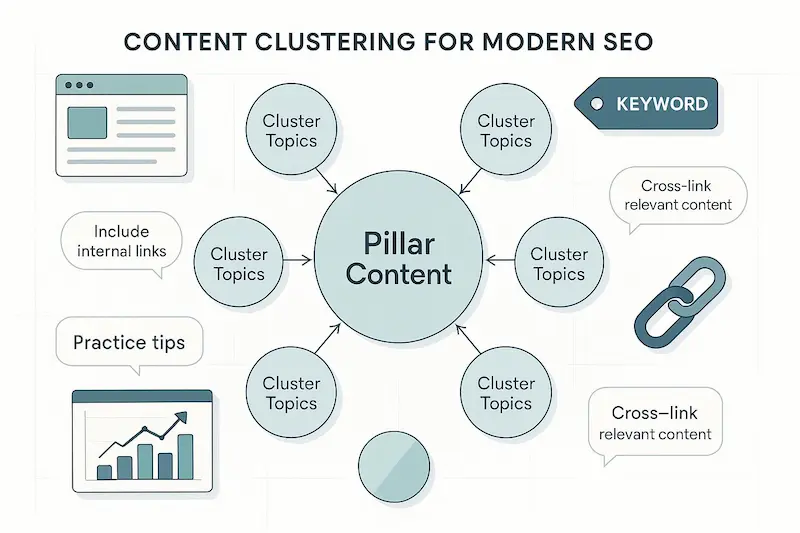
Add internal links only when another page genuinely helps the reader.
- Use descriptive anchor text.
- Connect related articles.
- Link supporting content to relevant pillar content.
- Avoid adding links just to increase the link count.
For example, naturally link to your guides on low-competition keywords and long-tail keywords where they fit.
Step 7: Improve Your SERP Click-Through Rate
If your page gets impressions but few clicks, review how it appears in Google.
- Improve the SEO title.
- Make the meta description more useful.
- Clearly communicate the benefit of reading the article.
- Avoid misleading or clickbait wording.
Use Google Search Console to identify pages with high impressions and low CTR.
Step 8: Help Google Discover and Index the Page
Before expecting your post to appear in search results, make sure Google can access and index it.
- Check that the page isn’t accidentally set to noindex.
- Make sure the URL is accessible.
- Add relevant internal links.
- Include the page in your XML sitemap.
- Use Google Search Console’s URL Inspection when necessary.
Remember: Being indexed doesn’t guarantee high rankings.
For detailed indexing steps, link to your dedicated guide: Index your blog on Google
Step 9: Update and Improve Underperforming Posts
If you’re learning how to rank blog posts on Google, updating underperforming content is an important part of the process. Don’t immediately rewrite a post just because it isn’t ranking.
First check Google Search Console for:
- Impressions
- Clicks
- CTR
- Search queries
- Average position
Then improve the areas that need attention—such as search intent, outdated information, content gaps, or unclear sections.
Simple process:
Monitor → Analyze → Improve → Monitor again.
How Long Does It Take to Rank a Blog Post?
One of the most common questions beginners ask after publishing an article is:
“How long will it take to rank on Google?”
There isn’t a fixed number of days or weeks that guarantees a ranking.
A new blog post may start appearing in search results relatively quickly, but meaningful visibility can take longer. The timeline depends on factors such as the topic, competition, relevance, site history, crawling and indexing, and how well the content satisfies the searcher’s needs.
What can affect the timeline?
1. Competition for the topic
A specific query with relatively little competition may be easier to compete for than a broad query dominated by established websites.
However, low competition doesn’t guarantee a particular ranking.
2. Your website’s existing content
A website with relevant, connected content can give readers more ways to explore a topic.
For example, a site covering keyword research, search intent, SEO writing, and content optimization can build a stronger topical structure than a site with one isolated article about SEO.
This is one reason a thoughtful topic cluster can be useful.
3. Content relevance and usefulness
If your article clearly answers the query and provides information that readers find useful, it has a stronger foundation than a page created primarily to target keywords.
Quality should come before chasing a specific ranking timeframe.
4. Crawling and indexing
Google needs to discover and process your page before it can appear in its search index.
If the page isn’t indexed, ranking isn’t possible.
That’s why checking your indexing status is an important part of the publishing process.
Don’t measure success only by position
Ranking isn’t the only useful signal.
After publishing, monitor:
- impressions
- clicks
- CTR
- search queries
- average position
- organic traffic
A page that initially receives impressions for several relevant queries may be showing early search visibility even if it hasn’t reached the position you want yet.
Use that data to decide whether the article needs improvement.
Give the content time—but don’t ignore the data
Avoid making major changes every few days because your page hasn’t reached the first page.
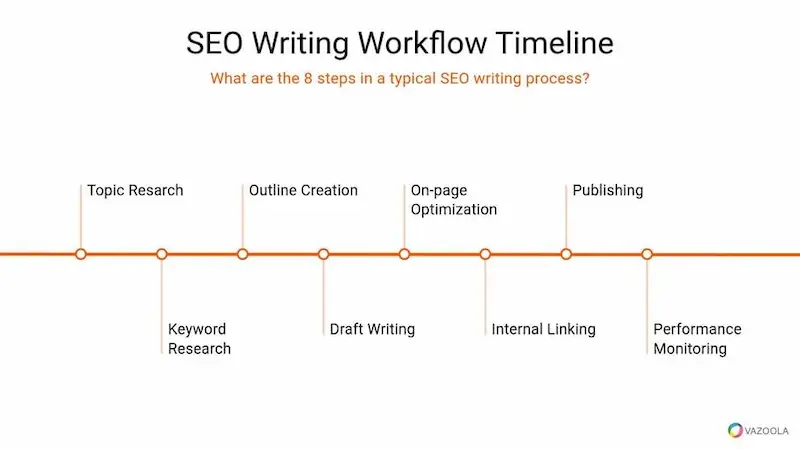
Instead:
Publish → Monitor → Analyze → Improve → Monitor again
This gives you a more reliable way to develop your content over time.
And remember:
No legitimate SEO strategy can guarantee that a blog post will rank #1 on Google within a specific timeframe.
Blog Post Ranking Checklist
Before you publish a new article—or update an existing one—run through this quick checklist.
🔎 Before writing
- Choose a topic that is relevant to your audience.
- Select a realistic target keyword.
- Check the current Google results for the query.
- Identify the searcher’s intent.
- Decide what useful information your article needs to provide.
✍️ While writing
- Use one clear H1.
- Organize the article with logical H2 and H3 headings.
- Answer the main question early.
- Add practical examples where they improve understanding.
- Cover the important aspects of the topic without unnecessary padding.
- Remove repetitive sections and ideas.
- Write naturally instead of forcing keywords into every paragraph.
⚙️ On-page SEO
- Write a clear, accurate SEO title.
- Create a useful meta description.
- Keep the URL simple and descriptive.
- Use relevant keyword variations naturally.
- Optimize images without stuffing keywords into alt text.
- Make the page easy to scan on desktop and mobile.
🔗 Internal linking
- Add contextual links to genuinely related pages.
- Use descriptive anchor text.
- Link to relevant pillar and supporting content where appropriate.
- Check that important pages aren’t isolated from the rest of your site.
- Don’t add links simply to reach an arbitrary number.
🌐 Before and after publishing
- Confirm the page isn’t accidentally set to
noindex. - Make sure the URL is accessible to search engines.
- Check that the page is included in your XML sitemap when appropriate.
- Inspect the URL in Google Search Console.
- Monitor impressions, clicks, CTR, and search queries over time.
- Update the article when meaningful improvements are needed.
The simple version
If you don’t want to remember the entire checklist, remember this:
Relevant topic → Right keyword → Matching intent → Useful content → Clear optimization → Relevant internal links → Indexing → Monitor and improve
That’s the complete process.
FAQs
How do I get my blog posts to rank higher on Google?
Target a relevant keyword, match search intent, create useful content, optimize the page, and add relevant internal links.
Why is my blog post not ranking on Google?
Common reasons include high competition, poor search intent alignment, weak content, or indexing issues. Check the page in Google Search Console.
How long does it take for a new blog post to rank?
There is no fixed timeframe. It depends on competition, content quality, relevance, and how quickly Google discovers and evaluates the page.
Can a new website rank on Google?
Yes. New websites can rank by creating helpful content around relevant and realistic search queries.
Do backlinks help blog posts rank?
Relevant backlinks can help strengthen a page’s authority, but useful content should come first.
How often should I update an old blog post?
Update it when information becomes outdated or when the content can be meaningfully improved. Avoid changing it just to refresh the date.
Conclusion
Ranking blog posts on Google is not about finding one secret SEO trick. It is about consistently creating content that is relevant, useful, easy to understand, and aligned with what people are actually searching for.
Before publishing, choose a realistic keyword and understand the search intent behind it. While writing, focus on answering the reader’s questions clearly, using practical examples, and covering the topic without unnecessary filler.
After publishing, don’t simply forget about the article. Check your Google Search Console data, watch how the page performs, identify opportunities for improvement, and update the content when there is a genuine reason to do so.
The process is simple:
Choose the right topic → Target the right keyword → Match search intent → Create useful content → Optimize the page → Add relevant internal links → Make sure Google can index it → Monitor and improve
Most importantly, remember that SEO is a process, not a one-time task. A blog post may need time, refinement, and better alignment with searchers before it reaches its potential.
If you’re building your SEO writing skills from the ground up, continue with our SEO Writing for Beginners guide to learn how to create search-friendly content that provides real value to readers.