Why Technical SEO Mistakes Beginners Make Are Hurting Your Rankings
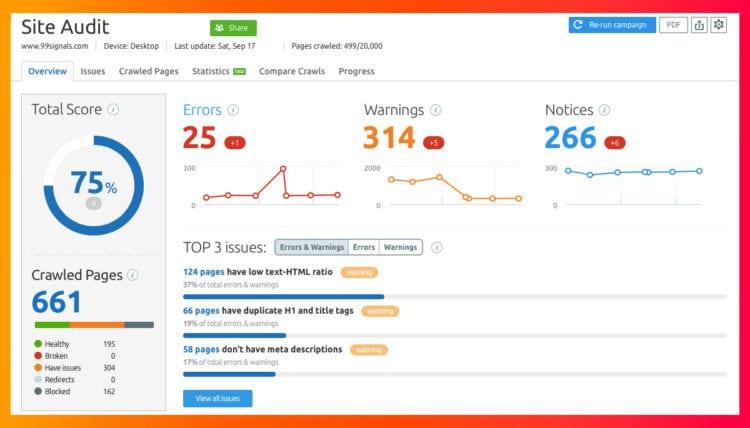
You published a blog post, added keywords, and waited for Google traffic—but your page still isn’t ranking. Before rewriting the entire article, check your website’s technical SEO.
Technical SEO helps search engines crawl, understand, and index your website. Problems such as incorrect noindex settings, crawl errors, broken links, poor mobile usability, or slow page performance can make it harder for Google to access and process your pages.
The good news? You don’t need to be a technical SEO expert to find many of these issues.
In this guide, you’ll learn the 10 most common technical SEO mistakes beginners make, why they happen, and the simple steps you can take to fix them.
Quick note: Technical SEO is only one part of SEO. If your technical foundation is healthy, you can then focus on content quality, search intent, keywords, and other ranking factors.
For the broader process of ranking a blog post, see our guide to How to Rank Blog Posts on Google.
What you’ll learn
- Why your blog may not be appearing in Google
- Common technical SEO errors beginners make
- How to check crawling and indexing problems
- How to fix basic website SEO issues
- A simple technical SEO checklist
Google’s Search Console documentation confirms that URL Inspection can help identify crawling and indexing problems and test whether a page is available to Google.
How Technical SEO Problems Can Stop Your Blog From Appearing in Google
If your blog post isn’t appearing in Google search results, the problem may not always be your content. A technical issue can prevent Google from properly crawling, indexing, or accessing your page.
Think of it as a simple process:
Google needs to:
- Find your page through links or your sitemap.
- Crawl the page and access its content.
- Index the page so it can potentially appear in search results.
If something blocks one of these steps, your content may not get the visibility you expect.
Common technical problems include:
- Pages accidentally marked noindex
- Important pages blocked by
robots.txt - Crawl errors or broken URLs
- Missing or poorly configured XML sitemap
- Slow or difficult-to-use pages
- Broken internal links
- Mobile usability problems
This doesn’t mean fixing technical SEO will automatically make a page rank. Your content still needs to be useful, relevant, and aligned with the searcher’s intent. The goal here is simply to make sure technical problems aren’t preventing your content from being discovered or processed properly.
Quick check
If a blog post is not appearing in Google, start with Google Search Console → URL Inspection. Check whether Google can access and index the specific URL before making major changes to the content.
🚫 10 Common Technical SEO Mistakes Beginners Should Avoid
Technical SEO problems don’t always look serious from the outside. Your website may load normally and your posts may look perfect, while search engines still face problems accessing or processing some pages.
Here are the most common technical SEO mistakes beginners make.
1. Your Website or Important Pages Aren’t Indexed
If a page isn’t indexed, it generally won’t appear in Google’s organic search results.
Possible causes include:
- An accidental
noindexdirective - Google hasn’t discovered the page yet
- The page is blocked from crawling
- Technical or quality issues affecting indexing
Fix: Use Google Search Console → URL Inspection to check the URL’s indexing status.
If indexing is your main problem, don’t turn this section into a full indexing tutorial. Instead, link to your dedicated guide:
👉 How to Index Your Blog on Google Faster
2. Crawl Errors Are Preventing Google From Accessing Pages
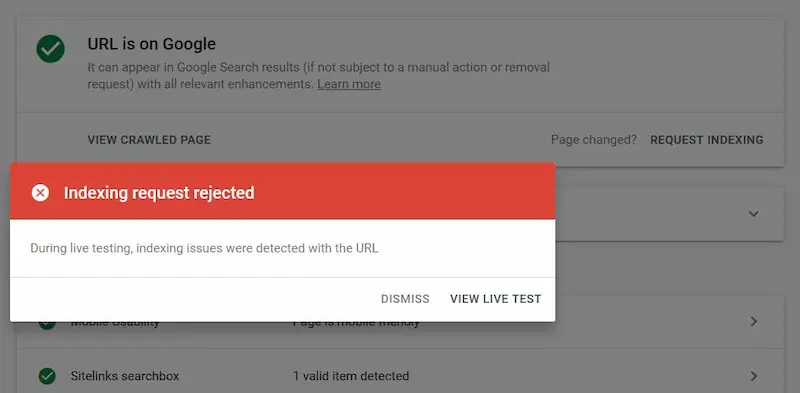
A crawl problem can occur when Googlebot has difficulty accessing a URL.
Common examples include:
- Server errors
- Broken URLs
- Pages that return errors
- Resources or pages blocked from crawling
Fix: Check relevant issues in Google Search Console and investigate URLs that Google cannot access properly.
3. Your Website Is Too Slow
Page performance can affect both user experience and how efficiently users interact with your site.
Common causes include:
- Unoptimized images
- Excessive scripts
- Poor caching
- Heavy page elements
Fix: Test important pages with PageSpeed Insights and optimize the largest performance problems first.
4. Your XML Sitemap Is Missing or Misconfigured
An XML sitemap helps search engines discover URLs on your website.
A sitemap doesn’t guarantee indexing, but a properly configured one can support URL discovery.
Fix: Make sure your sitemap contains the URLs you actually want search engines to discover and submit it through Google Search Console.
5. Incorrect Robots.txt or Noindex Settings
This is one of the mistakes beginners can make without realizing it.
A robots.txt rule can affect crawling, while a noindex directive can prevent a page from being included in search results.
Fix: Check both settings before assuming Google is ignoring your content.
6. Poor Mobile Usability
Most blog readers may access your content from mobile devices, so your pages should work properly on smaller screens.
Watch for:
- Text that’s difficult to read
- Buttons that are too close together
- Content extending beyond the screen
- Poorly responsive layouts
Fix: Test your important pages on mobile and correct layout or usability problems.
7. Duplicate or Very Similar Pages
When several URLs contain substantially similar content, it can make your site’s structure harder to manage and may create indexing or canonicalization issues.
Examples can include:
- Multiple versions of the same URL
- Duplicate pages
- Similar pages targeting the same topic
Fix: Review duplicate URLs and use appropriate canonicalization or redirects where necessary.
8. Broken Internal Links and 404 Pages
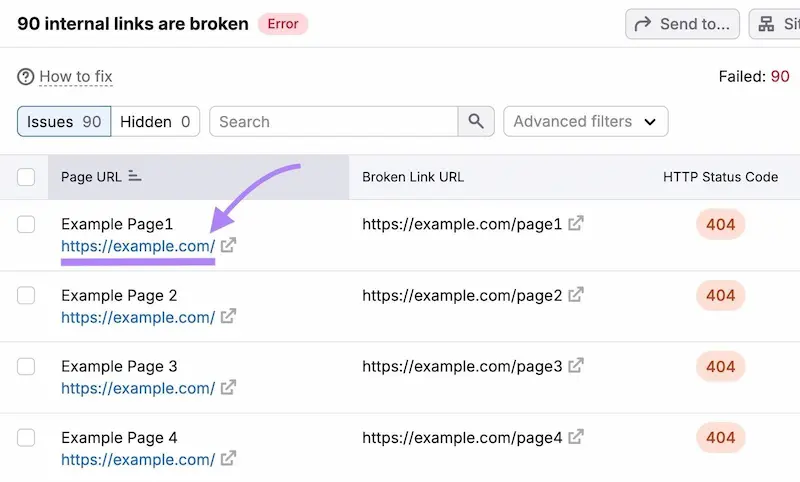
A broken internal link sends visitors to a URL that doesn’t work. Too many broken links can also make your site harder to navigate and maintain.
Fix:
- Check important internal links regularly
- Update outdated URLs
- Redirect permanently moved pages where appropriate
- Remove links pointing to deleted content
9. Images Are Missing Useful Alt Text
Alt text helps describe an image when it cannot be seen and provides additional context about the image.
Avoid stuffing keywords into every image description.
Better approach: Write concise, descriptive alt text that explains the image when alt text is appropriate.
10. Confusing URL Structure
A clear URL makes it easier for users to understand what a page is about.
Less clear:yoursite.com/post123?id=45
Clearer:yoursite.com/technical-seo-mistakes/
Keep URLs short, descriptive, and relevant to the page topic.
🔧 How to Check and Fix Technical SEO Issues
You don’t need to fix every technical SEO issue at once. Start with the problems that can directly prevent Google from accessing or understanding your important pages.
Use this simple process:
1. Check important URLs in Google Search Console
Open URL Inspection and test your important blog posts and pages.
Look for issues related to:
- Crawling
- Indexing
- Page availability
2. Check your website’s indexing
Make sure important pages aren’t accidentally marked noindex.
At the same time, check whether your robots.txt settings are blocking URLs that Google needs to access.
3. Review your sitemap
Make sure your XML sitemap contains the important URLs you want Google to discover.
Then check that the sitemap is submitted correctly in Search Console.
4. Check website performance
Run important pages through PageSpeed Insights.
Focus on practical problems such as:
- Large images
- Unnecessary scripts
- Slow-loading resources
- Poor mobile performance
5. Fix broken links and URLs
Check your internal links and important pages for 404 errors.
If a page has permanently moved, use an appropriate redirect rather than leaving visitors on a dead URL.
Simple rule: Fix technical problems that prevent access, crawling, indexing, or usability before spending time on minor technical tweaks.
Best Tools to Find Technical SEO Issues
You don’t need many SEO tools to find common technical problems.
- Google Search Console — Check indexing, crawling, and sitemap issues.
- PageSpeed Insights — Check page speed and performance problems.
- Screaming Frog — Useful for finding broken links, redirects, and other issues on larger sites.
For a beginner blog, Google Search Console + PageSpeed Insights are enough to start.
📋 Technical SEO Checklist for Beginners
Before moving on from a technical SEO problem, quickly check:
- ✓ Important pages can be crawled and indexed
- ✓ XML sitemap is submitted and working
- ✓ Important pages are not accidentally set to
noindex - ✓ Robots.txt isn’t blocking important URLs
- ✓ Internal links don’t lead to broken pages
- ✓ Important pages work properly on mobile
- ✓ Images and pages load efficiently
- ✓ Important URLs return the correct status code
If these basics are in place, you have a stronger technical foundation for your content.
❓ FAQ
1. What are technical SEO mistakes?
Technical SEO mistakes are website problems that can make it harder for search engines to crawl, access, or index your pages. Common examples include incorrect noindex settings, crawl errors, broken links, and poor mobile usability.
2. Why is my blog not ranking on Google?
Your blog may not be ranking for several reasons, including indexing problems, crawl errors, slow performance, or other SEO issues. Check the affected URL in Google Search Console before changing your content.
3. How do I check technical SEO issues?
Start with Google Search Console to check indexing, crawling, and sitemap issues. You can also use PageSpeed Insights to identify page performance problems.
4. Does technical SEO affect Google rankings?
Technical SEO helps make your website accessible to search engines and users. However, fixing technical issues alone does not guarantee higher rankings. Content quality, relevance, search intent, and other SEO factors also matter.
5. What should I fix first in technical SEO?
Start with issues that can prevent Google from accessing or indexing important pages. Check indexing, robots.txt, sitemap, crawl errors, broken links, and mobile usability before focusing on minor technical improvements.
Final Thoughts
Technical SEO doesn’t need to be complicated. For beginners, the priority is making sure Google can crawl, access, and index your important pages.
Start by checking:
- Indexing and crawl errors
- XML sitemap
robots.txtandnoindexsettings- Broken links
- Mobile usability
- Page performance
Fix these basic issues first, then continue improving your content and overall SEO strategy.
For the bigger picture, read our guide on How to Rank Blog Posts on Google.
You can also explore the site’s complete sitemap to find more SEO writing and blogging guides.