How to Index Your Blog on Google Faster (Step-by-Step Guide)
Publishing a blog post is only the first step. Before it can appear in Google Search, Google needs to discover, crawl, and process the page.
If your new blog post is not showing in Google, it does not necessarily mean there is a ranking problem. The URL may not have been discovered yet, or a technical issue may be preventing Google from crawling or indexing it.
In this guide, you’ll learn how to index your blog on Google faster by checking your page in Google Search Console, improving relevant internal links, submitting your XML sitemap, and fixing common indexing issues.
These steps can make your pages easier for Google to discover and process, but there is no guaranteed indexing timeframe. Indexing and ranking are separate processes, so getting a page indexed does not automatically mean it will rank.
Why Is My Blog Post Not Getting Indexed by Google?
If your new blog post is not showing in Google, the issue may involve URL discovery, crawling, indexing, or page-level SEO settings. Check these common problems before changing your keywords or rewriting the article.
1. Google Hasn’t Discovered the URL
Google needs to discover your URL before it can crawl and process the page.
Relevant internal links and an XML sitemap can help Google find important URLs on your website.
2. Your Sitemap Is Missing or Not Updated
An XML sitemap lists important URLs that you want search engines to discover.
Make sure your new blog post is included in the sitemap and that the sitemap is accessible in Google Search Console.
3. The Page Has a noindex Directive
A noindex instruction can prevent a page from appearing in Google Search.
Check your WordPress SEO settings and use URL Inspection in Google Search Console to identify indexing issues.
4. Googlebot Can’t Crawl the Page
Crawlability problems can prevent Google from accessing your content.
Check for:
robots.txtblocks- Server errors
- Incorrect canonical tags
- Broken URLs
5. The Content Is Thin or Duplicated
Pages with little original value or substantial duplication may not be indexed.
Make sure your post answers a specific search query and provides useful, original information.
6. The Page Has Few Relevant Internal Links
Link your new post from relevant existing articles using descriptive anchor text. This can help search engines discover the URL and understand its relationship to other pages on your site.
For example, when discussing crawlability or indexing problems, you can link to Technical SEO Mistakes Beginners Make.
How Google Finds and Indexes a Blog
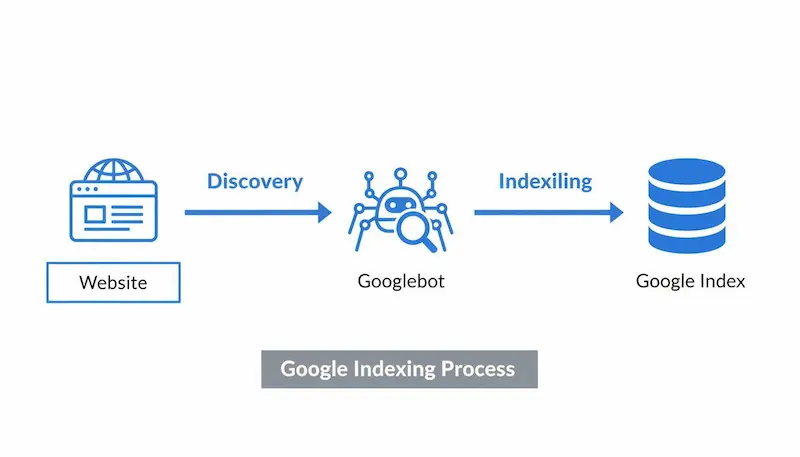
If you’re learning how to index your blog on Google faster, first understand how Google discovers, crawls, and processes a new blog post. To understand how to get a new blog post indexed by Google, it helps to know the three basic stages Google uses to process a page.
1. Discovery
Google first needs to discover the URL. It can find a new page through internal links, XML sitemaps, or other known URLs.
2. Crawling
Googlebot accesses the URL and reads the page. Technical problems, server errors, or blocked resources can interfere with crawling.
3. Indexing
After crawling and processing the page, Google may decide whether to add it to its search index.
Crawled does not always mean indexed, and indexed does not guarantee rankings.
Discovery vs. Crawling vs. Indexing
- Discovered: Google knows the URL exists.
- Crawled: Googlebot has accessed the URL.
- Indexed: Google has processed the page and included it in its search index.
If you’re asking “how do I get my new blog post indexed by Google?”, focus first on making the page accessible, discoverable, and crawlable. Then use Google Search Console to check its indexing status.
How to Index Your Blog on Google Faster (Step-by-Step)
✅ Step 1: Check Your Blog Post in Google Search Console
Before taking further action, check whether Google already knows about your page.
Open Google Search Console → URL Inspection and enter the complete URL of your blog post.
Review the inspection result to see whether the page has been:
- Discovered by Google
- Crawled by Google
- Indexed
- Affected by an indexing issue
This gives you a clearer starting point because it shows what Google currently knows about the URL.
When learning how to index your blog on Google faster, URL Inspection helps you identify whether the problem is discovery, crawling, or indexing.
✅ Step 2: Request Indexing for Your New Blog Post
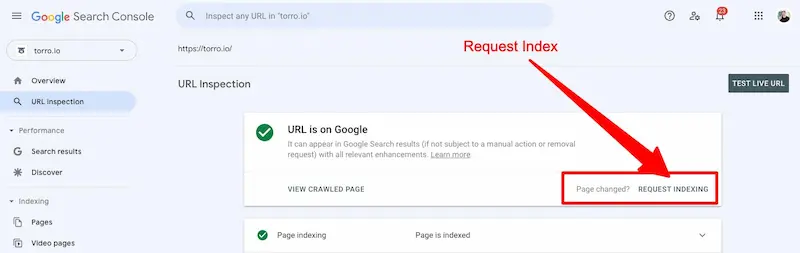
If the page is eligible for indexing but has not been indexed yet, you can use the Request Indexing option in Google Search Console.
How to request indexing
- Open Google Search Console.
- Select URL Inspection.
- Enter your published blog post URL.
- Review the inspection result.
- Select Request Indexing if the option is available.
Use this option after publishing or making substantial updates to an important page. Keep in mind that a request does not guarantee immediate crawling or indexing.
✅ Step 3: Add Relevant Internal Links to Your New Post
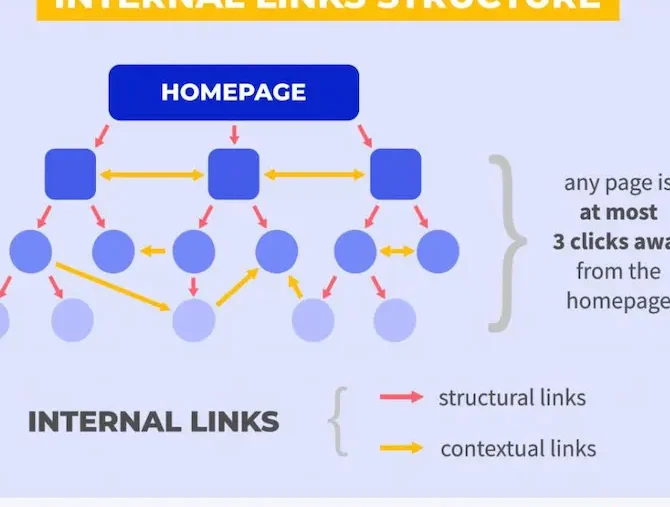
Add relevant internal links from existing articles to your new blog post.
Choose pages that are closely related to the new topic and add links where they provide useful context for readers.
Aim for 2–3 relevant contextual links when appropriate, but do not add links just to increase the number of internal links.
Use descriptive anchor text that clearly tells readers what the linked page is about instead of generic phrases such as “click here.”
Relevant internal links are an important part of how to index your blog on Google faster because they can help Google discover related pages within your website.
For example, an article discussing crawlability or indexing can naturally link to your How to Index Your Blog on Google Faster guide.
✅ Step 4: Check and Submit Your XML Sitemap
Check that your important blog post is included in your XML sitemap.
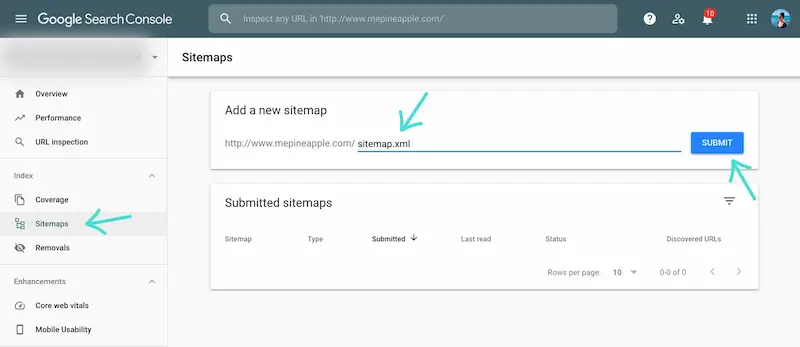
If you need to submit a sitemap in Google Search Console:
- Open Google Search Console → Sitemaps.
- Enter your sitemap URL.
- Select Submit.
For many WordPress websites, the sitemap is generated automatically by WordPress or an SEO plugin. Before submitting it, make sure the sitemap is accessible and includes the important URLs you want Google to discover.
Also check that your newly published post has not been accidentally excluded from the sitemap.
If you’re wondering how to submit a blog sitemap to Google Search Console, go to:
✅ Step 5: Fix Technical Issues That Can Prevent Indexing
If your page is still not indexed, check for technical issues that may prevent Google from accessing or processing the URL.
Check these areas:
- Noindex: Make sure the page is not intentionally marked
noindex. - Robots.txt: Check that important content is not blocked from crawling.
- Canonical URL: Make sure the canonical points to the correct version of the page.
- HTTP errors: Confirm that the URL loads normally and does not return a server error.
- Broken links: Check that links pointing to the page work correctly.
For a deeper explanation of crawlability and other technical SEO problems, see Technical SEO Mistakes for Beginners
✅ Step 6: Make Sure Your Blog Post Is Useful and Accessible
Technical settings are not the only things to check. Your page should provide clear, original information that matches its intended search query.
Before requesting indexing, check that:
- The page has a clear topic.
- The content provides useful, original information.
- The main information is accessible to visitors.
- The page is not substantially duplicated on another URL.
- The article has a clear place within your website structure.
Avoid adding unnecessary text simply to make the article longer. Focus on answering the specific question clearly and remove sections that repeat information covered in other articles.
This article focuses on helping a blog post get discovered, crawled, and indexed. Detailed strategies for improving search rankings belong in your How to Rank Blog Posts on Google guide.
How Long Does Google Take to Index a Blog?
There is no fixed timeframe for Google to index a new blog post. The timing can vary depending on factors such as URL discovery, crawlability, website structure, and how Google processes the page.
If you’re wondering how long it takes Google to index a new blog post, check the URL in Google Search Console instead of relying on a specific number of hours.
What Can Affect Indexing Time?
Several factors can influence when Google discovers and processes a page:
- URL discovery: Internal links and an XML sitemap can help Google find the page.
- Crawlability: Technical problems can prevent Googlebot from accessing the URL.
- Site structure: A clear connection between related pages can make important content easier to discover.
- Page quality: The article should provide useful, original information rather than substantially repeating another page.
- Google’s processing: Even after crawling, Google may take additional time to process and decide whether to index the URL.
Instead of repeatedly requesting indexing, check Google Search Console for the latest status and investigate any reported issue.
Still Not Indexed? What to Check
If you’re learning how to index your blog on Google faster and your blog post is still not indexed, use Google Search Console to identify the issue instead of repeatedly requesting indexing.
Check These 6 Things
1. Is the URL set to noindex?
Check your page’s indexing settings and the URL Inspection report.
2. Can Google crawl the page?
Check for robots.txt blocks, server errors, or other crawlability problems.
3. Is the page included in your XML sitemap?
Confirm that the important blog post is included in your submitted sitemap.
4. Does the page have relevant internal links?
Check that related existing articles link to the new page where appropriate.
5. Is there another similar URL?
If another page covers substantially the same topic, review whether the correct URL is being treated as the main version.
6. Does the article provide unique value?
Review the page for unnecessary repetition, thin sections, or substantial duplication.
When Should You Investigate Further?
If Google Search Console reports a specific indexing problem, investigate that issue rather than repeatedly requesting indexing.
For deeper technical troubleshooting, see Technical SEO Mistakes for Beginners.
FAQ About Google Blog Indexing
How long does it take Google to index a new blog post?
Google does not provide a fixed indexing timeframe. A new blog post may be indexed after Google discovers and crawls it, but the timing can vary. Use Google Search Console to check the URL’s current indexing status.
How do I index my blog on Google faster?
To make your blog easier for Google to discover and process, add relevant internal links, keep the URL in your XML sitemap, check for noindex or crawlability problems, and use the URL Inspection tool to request indexing when appropriate.
There is no guaranteed timeframe for indexing.
Why is Google not indexing my new blog post?
Common issues include a noindex directive, crawlability problems, sitemap issues, missing internal links, duplicate content, or other technical problems. Check the URL Inspection report to identify the issue affecting your page.
How do I check if my blog post is indexed by Google?
Open Google Search Console and use the URL Inspection tool. Enter your complete blog URL to check whether Google has indexed the page and whether an indexing issue has been reported.
Does submitting a sitemap guarantee Google will index my blog?
No. An XML sitemap helps Google discover URLs, but submitting a sitemap does not guarantee that every URL will be crawled or indexed.
Can I force Google to index a blog post?
You cannot guarantee or force immediate indexing. You can use Google Search Console’s Request Indexing option for an eligible URL while making sure the page is accessible, internally linked, and free from common indexing problems.
Conclusion
Learning how to index your blog on Google faster starts with making your page easy for Google to discover, crawl, and process.
After publishing, check the URL in Google Search Console, make sure the page is accessible and included in your XML sitemap, add relevant internal links, and fix any technical issues that may affect crawling or indexing.
Remember, indexing is not the same as ranking, and there is no guaranteed timeframe for either process.
For the next step, read our complete guide on How to Rank Blog Posts on Google to learn about the SEO factors that can improve your content’s search visibility.

About the Author
Khushbakht Aaliya
Khushbakht Aaliya is an SEO content writer and the founder of The Calm Quill Writes. She creates practical, beginner-friendly guides on SEO writing, keyword research, search intent, and content strategy.
Through The Calm Quill, she shares simple explanations and actionable techniques to help beginners create useful, well-structured content for readers and search engines.